I built a live side panel for my Claude Code agents
I run several Claude Code agents at once and kept losing track of them. So I built agents-flow, a mod that docks a live panel beside the chat: each agent's name, model, effort, an amber progress bar and what it's doing right now. Here's how it works and how to install it.
I run most of my work through Claude Code agents now: a developer agent on Opus at max effort, a test agent on Sonnet, an Explore agent on Haiku, often three or four at once in the background. The transcript tells me when one starts and when it finishes. In between, I was guessing. Which one is still going? Which model is it on? Is it nearly done, or stuck?
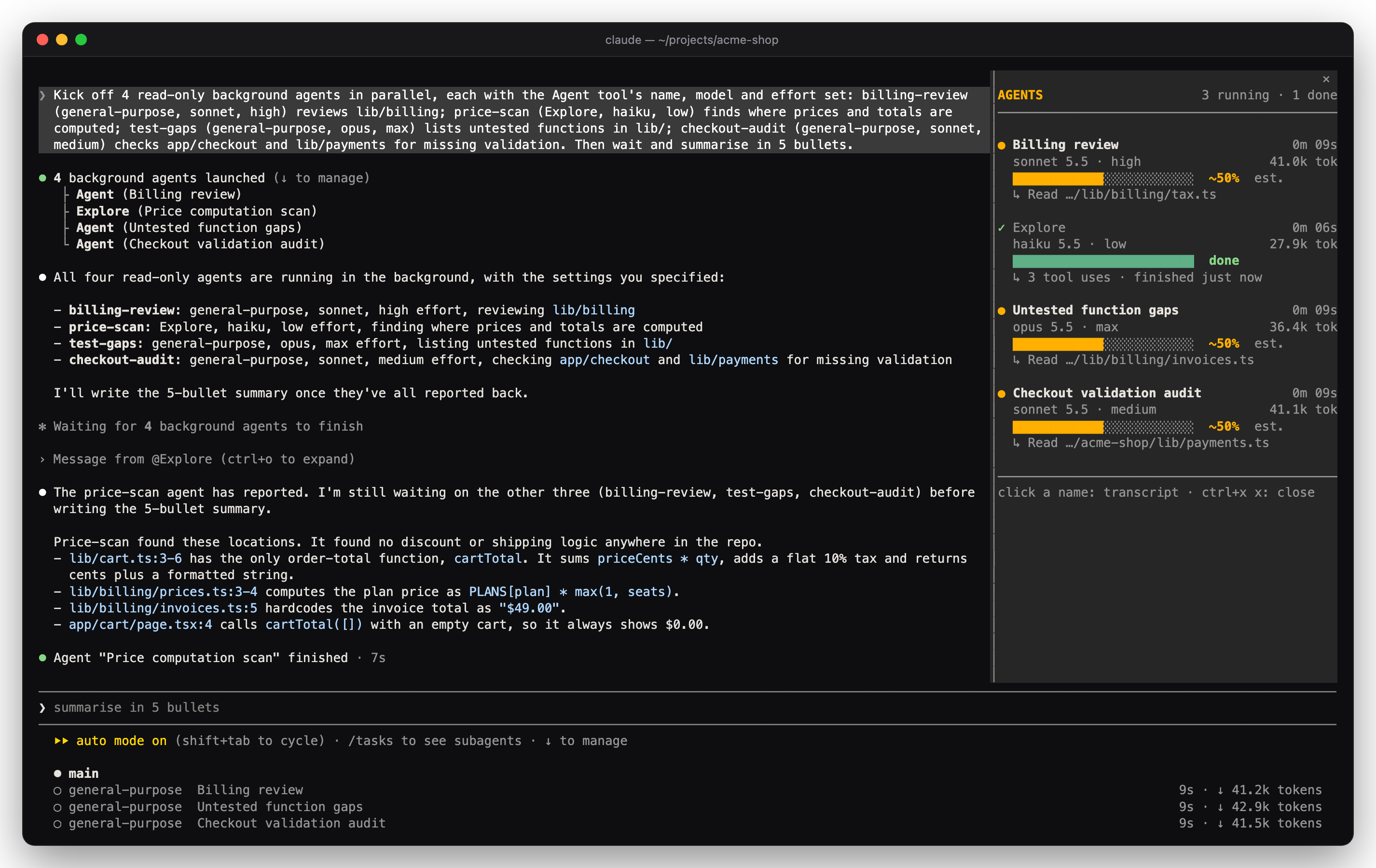
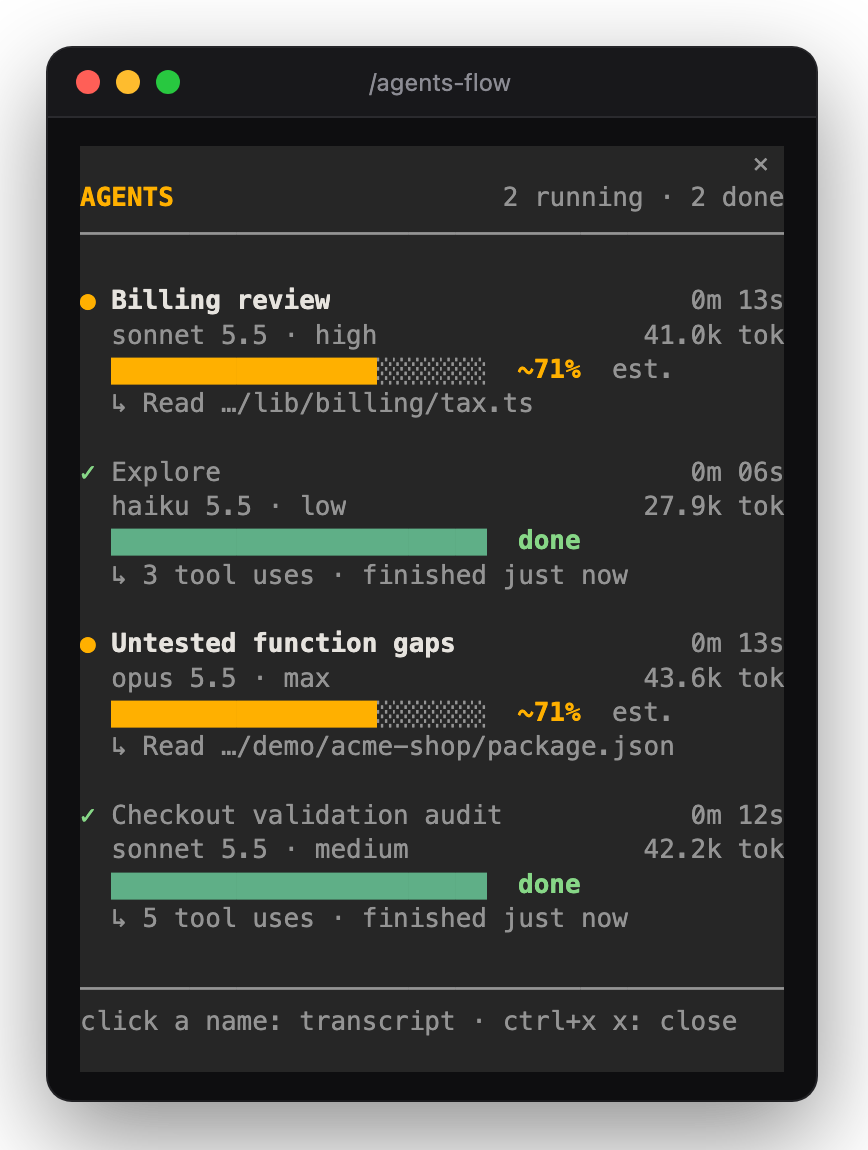
So I built agents-flow. Type /agents-flow and a panel docks beside the chat with one block per agent: name, model and effort, an amber progress bar, the tool call it's making, how long it has run and how many tokens it holds.
What was missing
Claude Code already lists background agents under the prompt, with elapsed time and tokens. Three things weren't there: the model and effort each agent actually runs on (its definition, the call's override and the session default all have a say), any sense of progress, and what it's doing this second. I wanted all of it in one place that stays on screen while I keep typing.
How it works: a Claude Code mod
A Claude Code mod is a plugin made of function hooks: one TypeScript module, with on(event, hook) calls that see what the session does. agents-flow hooks four events, polls one call and draws one pane:
agent.spawn: a new agent's name, type and resolved model.turn.step: every model request the agent makes, with the model and effort actually sent, then the tokens it used.tool.call: the agent's current tool call ("Read lib/billing/tax.ts") and any task list it keeps.turn.complete: done, failed or stopped.$.agent.list(), once a second: which agents are waiting on your approval.ui.renderfor aPane: the panel itself, drawn withBox,TextandButton.
It only watches. It never changes or blocks a call, makes no network requests, reads none of your files and runs no commands. The panel's data lives in session state, so it survives the mod reloading mid-run.
The progress bar problem
No agent reports "62% done". So the bar uses the best signal it has:
- The agent's own task list, when it keeps one ("5/8 tasks").
- Otherwise an estimate. The mod remembers how long the last ten runs of each agent type took and shows elapsed time against the median, as "~43% est.", capped at 95%.
- With no history yet, or once an agent runs past its usual time, a dim moving shimmer labelled "taking longer".
I'd rather the bar admit it doesn't know than fake a number.
Design first, then code
I didn't start with code. I had Claude mock up the panel as an animated design, with toggles for the extras, and approved it before anything was built. The extras that made the cut: the current tool call, time and tokens, clicking a name to open that agent's transcript, sub-agents indented under their parent, and a status line that counts running agents while the panel is closed.
The screenshots are from real sessions: four agents on Sonnet high, Haiku low, Opus max and Sonnet medium, captured in tmux. Those runs caught three things the tests didn't. A "dim" colour draws plain gray in Claude Code's renderer, so finished bars lost their green. Unnamed agents all read "general-purpose", so they now go by their task. And subagents couldn't keep task lists in those sessions, which is why the estimate matters. All fixed, and covered by nine tests that run with claude plugin test.
Install it
At the Claude Code prompt:
/plugin install agents-flow --marketplace ludmal/agents-flow
Then type /agents-flow. To dock the panel on the right, switch to fullscreen once with /tui fullscreen (the terminal needs 110+ columns). Otherwise it opens above the prompt with one line per agent. Run /agents-flow again to close it. The source, screenshots and tests are on GitHub.
Takeaways
- If you run more than one agent at a time, make their state visible. Guessing costs more than a panel.
- Mods are a small API. A few hooks and one render function gave me a live UI with no server and no dependencies.
- Be honest in progress UI. An estimate labelled as one, and a shimmer when you don't know, beat a bar parked at 99%.
- Skip it if you mostly run one agent in the foreground. The transcript already shows you everything.